
A simple guide for good Git Branch Management
Recently, I found myself needing to clean up some commits in a branch I was working on. Interactive rebase came to my rescue - it's a powerful command that helps organize commits before that final push. This experience inspired me to research and share the best Git practices for smooth branch management.
Essential Git Commands for Daily Use
Before diving into advanced techniques, let's review the fundamental commands that form the backbone of branch management:
# View all branches including remote tracking ones
git branch -a

# Delete local branch (-d for safe delete, -D to force)
git branch -d feature-branch

# Delete remote branch
git push origin --delete feature-branch

# Create and switch to new branch in one command
git checkout -b new-feature

# Or using the modern Git syntax
git switch -c new-feature

# Rename current branch
git branch -m new-branch-name

# List merged/unmerged branches
git branch --merged
git branch --no-merged

# Update branch with latest main without switching
git fetch origin main:main

# Clean up local references to deleted remote branches
git remote prune origin

# See full branch history with graph
git log --graph --oneline --decorate --all
Using Interactive Rebase
Interactive rebase is a powerful tool for maintaining a clean Git history. While the command line interface works well, using VS Code (or your preferred IDE) can make the process more intuitive and easier to navigate.
First, set up VS Code as your default Git editor:
git config --global core.editor "code --wait"
To start an interactive rebase:
# Rebase against a specific branch
git rebase -i <branch-name>

# Or rebase the last N commits
git rebase -i HEAD~N
How it looks like with VSCode:
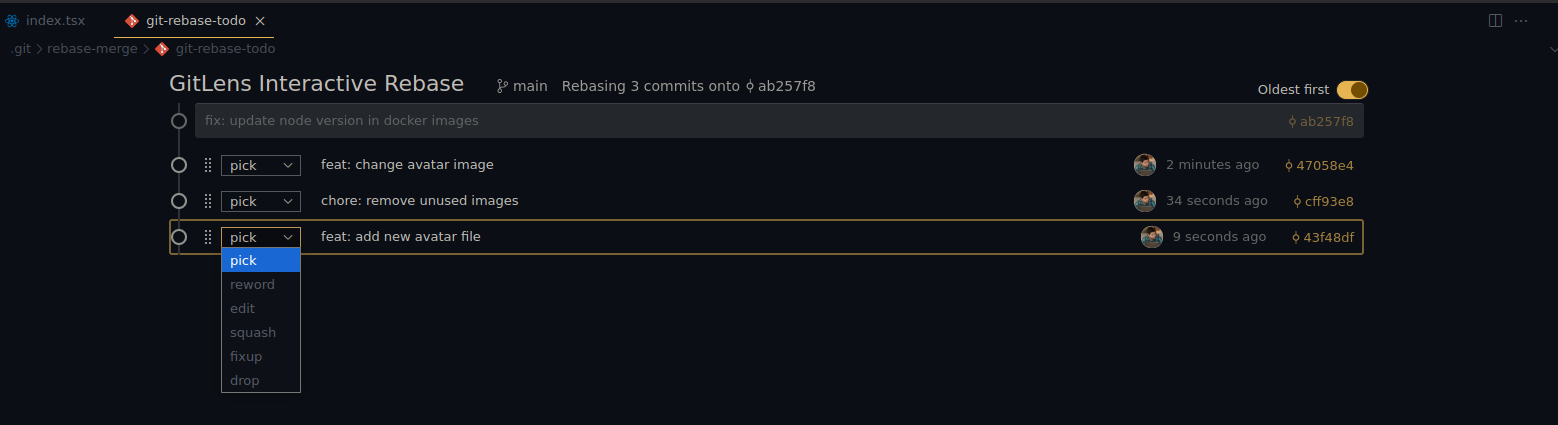
Available Rebase Options
pick: Keep the commit as isreword: Change the commit messageedit: Stop for amending - useful when you need to modify the commit's contentssquash: Combine with previous commit and merge commit messagesfixup: Like squash, but discard this commit's message - great for "fix typo" commitsdrop: Remove the commit completelyexec: Run a command after each line - useful for running tests
Handling Rebase Conflicts
Sometimes rebases don't go smoothly. Here are the commands you'll need:
# Continue after resolving conflicts
git rebase --continue

# Abort the rebase and return to original state
git rebase --abort

# Skip the current commit
git rebase --skip
Efficient Git Aliases
Here are some cool git aliases:
# .gitconfig file
[alias]
  # Logging
  ll = log --oneline
  lg = log --graph --oneline --decorate --all

  # Quick commits
  c = commit -m
  a = add -A
  ac = !git add -A && git commit -m

  # Work in progress
  wip = !git add -A && git commit -m 'wip'
  unwip = reset HEAD~1

  # Branch management
  list-merged = "!git branch --merged | grep -v '*'"
  cleanup = "!git fetch --prune && git branch --merged | grep -v '*' | xargs git branch -d"
  sync = !git fetch origin && git rebase origin/main

  # Status shortcuts
  s = status -s
  b = branch --all
Important Note About Branch Cleanup
The cleanup alias is powerful but should be used with caution. It will:
- Remove all local branches that have been merged into your current branch
- Delete references to remote branches that no longer exist
Cannot be undone once executed
Before running git cleanup:
- Check which branches will be deleted using
git list-merged - Ensure you're on the correct branch (usually main/master)
- Verify that all important work has been pushed to remote
Best practices for branch management
- Use Descriptive Branch Names
- Follow a consistent naming convention aligned with conventional commits:
feat/- New featuresfix/- Bug fixesdocs/- Documentation changeschore/- Maintenance tasksrefactor/- Code refactoringtest/- Adding or modifying testsstyle/- Code style changesperf/- Performance improvements
- Include ticket numbers if applicable:
feat/TICKET-123-user-auth - Use kebab-case for readability:
feat/add-user-authentication - Maybe add some emojis 😜
- Follow a consistent naming convention aligned with conventional commits:
- Keep Branches Updated
- Regularly rebase feature branches on main to avoid complex merges
- Use
git fetchfrequently to stay aware of remote changes
- Maintain Clean Branches
- Keep branches focused on single features or fixes
- Avoid
wipcommits, and use of interactive rebase to maintain clean commit history - Delete branches promptly after merging
- Establish Clear Branch Lifecycle
- Short-lived feature branches (1-2 weeks maximum)
- Regular cleanup of stale branches
- Document branch purpose and status
I believe that these are the commands that you might use for 80% of the time. Maybe you'll need git reflog at some point, but that's for another article.
To be honest, when we work with good workflow you won't be needing to do a lot of branch management. If you can break User Stories into small meaningful tasks, your branches probably will follow the pattern and flow correctly.
I hope this git tricks can help you! Thank you for reading this far.
Bye,